K-1 Manager
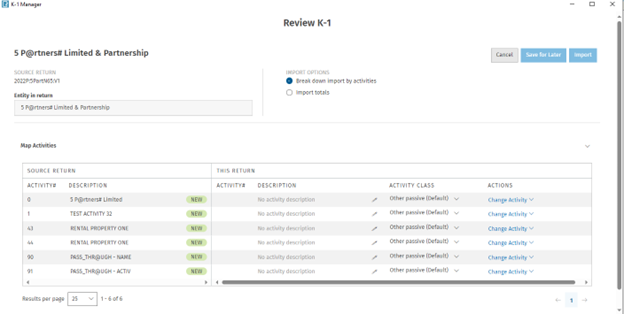
This provides an overview summary of all the K-1s that are in the 1040 tax return making it easier for users to review and manage the context.
-
K-1 Manager screen can be accessed through Import/Export > K-1 Data > K-1 Data from 1065 returns.
-
Only 1065 K-1s are able to be imported using this screen.
-
The "Last Imported" reflects the most recent date when the K-1 was imported into the 1040 return.
-
“Last Updated” is the last time changes were made in the 1065 return.
-
Actions:
-
Import – K-1- will be imported into the return but user does not have the ability to break it out by activities. Only total numbers will get imported into the 1040 return.
-
Review K-1 – this will take the user to the next screen where they are able to import K-1 data by activities.
-
Delete K-1 Import file – This will delete the import file but it will not delete the K-1 from the return. User will still have to go into the return and delete the actual K-1.
-
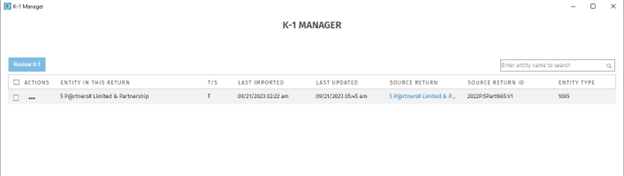
Activity Mapping Screen: A streamlined process of mapping activities coming from the 1065 K-1.
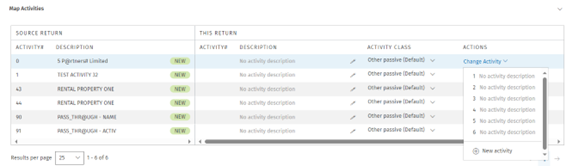
In the "Actions" column, user can either add a new activity or map the existing activity related to the K-1:
-
Activity numbers will never be repeated in a return.
-
Once an activity number has been assigned it will appear under “this return” “activity number”.
-
User can select the pen icon to edit the description of each activity.
-
Under Activity class, user is able to select from one of the following options:
-
Other passive default
-
Non passive
-
Active rental real estate
-
Materially participating real estate professional
-
Subject to recharacterization riles – rental real estate
-
Subject to recharacterization rules – other
-
-
User can select to save for later if they are not ready for the K-1 to be imported into the return.
-
Once the K-1 is ready to be imported into the return then can select import.
-
If user selects cancel a pop-up notification will appear and asking if they are sure they want to cancel. If the user selects yes then the changes they have made to the activity mapping screen will get voided.