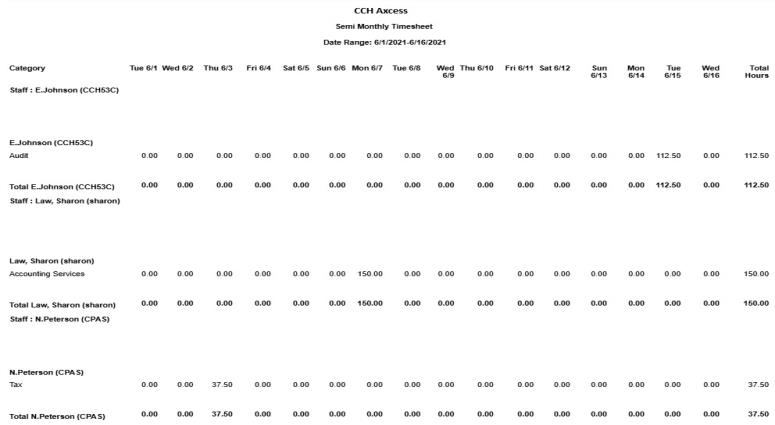
Semi-Monthly Timesheet
The Semi Monthly Timesheet report includes time entered by staff for a semi monthly (16 day) period of time. Use this report to view time totals for your firm’s staff. This report can be printed to include to show details by various details of the time transactions as well as summarizing by Billable, Nonbillable, or both.
Permissions Required for this Report
In the staff profile, staff must be assigned to a security group that is granted View functional rights for the following:
-
Security group profile > Functional rights > Reports > Shared Library > Shared Views
-
Security group profile > Functional rights > Reports > Firm Library > Custom
-
Security group profile > Functional rights > Reports > Firm Library > Standard > Firm
-
Security group profile > Functional rights > Reports > Firm Library > Standard > Practice
-
Security group profile > Functional rights > Reports > Firm Library > <report name>
Reports in Foundation that are Comparable
In Practice Management, the comparable report is Semi Monthly Timesheet. In Practice Advantage, the comparable report is Timesheet.
Report Specifications
The following report options and filters are available to determine the report contents.
| Options and Settings | ||
|---|---|---|
| Option | Setting | Description |
| Show Details by | List | Choose the details displayed for the staff |
| Summarize by | List | Choose By additional summary options |
| Default Filters | ||
| Field Name | Operator | Value |
| Start Date | = | First Day of Current Month |
| Optional Filters | |||
| Available Fields | |||
| Area of Expertise | Pay Type | Staff ID/Name | Staff Region |
| Billable Type | Project ID/Name | Staff Business Unit | Staff Reporting Manager |
| Category ID/Name | Service Code ID/Name | Staff Office | Start Date |
| Department | Skill Level | Staff Position | Subcategory ID/Name |
| Grouping | |
|---|---|
| Available Fields | |
| Department | Staff Name |
| Report Name | Staff Office |
| Staff | Staff Position |
| Staff Business Unit | Staff Region |
| Staff ID | Staff Reporting Manager |
| Sorting | |
| There are no sorting options for this report. |
Report Fields
The following fields are available for this report. The fields that display and the position of fields are based on the report's settings, grouping, sorting, and filters.
| Report Fields | |
|---|---|
| Fields | Description |
| Staff | The staff name in Last Name, First Name format and Staff ID |
| Day One Hours | The hours for the first date in the date range. |
| Day Two Hours | The hours for the second date in the date range. |
| Day Three Hours | The hours for the third date in the date range. |
| Day Four Hours | The hours for the fourth date in the date range. |
| Day Five Hours | The hours for the fifth date in the date range. |
| Day Six Hours | The hours for the sixth date in the date range. |
| Day Seven Hours | The hours for the seventh date in the date range. |
| Day Eight Hours | The hours for the eighth date in the date range. |
| Day Nine Hours | The hours for the ninth date in the date range. |
| Day Ten Hours | The hours for the tenth date in the date range. |
| Day Eleven Hours | The hours for the eleventh date in the date range. |
| Day Twelve Hours | The hours for the twelfth date in the date range. |
| Day Thirteen Hours | The hours for the thirteenth date in the date range. |
| Day Fourteen Hours | The hours for the fourteenth date in the date range. |
| Day Fifteen Hours | The hours for the fifteenth date in the date range. |
| Day Sixteen Hours | The hours for the sixteenth date in the date range. |
| Total Hours | The total hours for the staff for the date range selected. |
Timesheet Sample Report